How it works
Electronic filing, or eFiling, lets you send tax forms to the IRS online instead of mailing paper copies.
Most common federal forms can be eFiled, and a growing number of states accept it too. Since 2024, the IRS requires anyone filing 10 or more forms, like 1099s and W-2s, in a year to eFile them.
Signing up for Adams is free with no strings attached! You only pay when you file. Prices depend on how many forms you eFile, and differ for federal and state forms. See our Pricing page for details.
Add-on services can be included for specific forms at checkout or after you eFile, without any hidden charges or surprise costs.
Yes! Our system is SOC 2 compliant and your data is encrypted both when it’s stored and when it’s sent. Every account also uses two-step sign-in, adding an extra layer of protection, so you can file with confidence.
Getting started
Signing up
eFiling
Adding issuers
Using the dashboard
To see your filings from a previous tax year, open the dropdown menu next to the current tax year in your dashboard, and select the year you want to view.
To view specific forms from a previous tax year, navigate to the Forms page using the navigation bar. Choose a year from the dropdown menu, and view and download your forms as needed.
You can add new forms to any tax year. Forms added to a past tax year won’t be eFiled.
Choose the year from the tax year menu on your dashboard, then go to “Forms” and add a new form. Choose the form type, select the issuer and recipient, enter your data and save. Once saved, the form can only be printed.
Go to “Import” and choose “Copy from Last Year”. Pick the issuers, recipients and form setup you want to reuse. Dollar amounts are not copied, so your new forms appear on the forms page as "Incomplete".
Open each form, enter this year's amounts and save. You can run a TIN Check at any point, even before a form is complete. Once complete, your form will be labelled "Ready" and can move to checkout and eFiling
Yes! On the forms page, select your form, click "Print", then choose Download. The PDF saves to your computer.
Go to “Import”, choose “Excel or CSV file”, then “Continue”. Select issuers and recipients, download the template and fill it in. Upload your file and we’ll check it and flag anything that needs your attention before you finish.
If you've followed the instructions above, your blank template should start downloading automatically, and appear in your downloads folder. If the download doesn't start, ensure your browser is set to allow pop-ups and file downloads.
If something in your file can't be imported, the review step shows each issue and the row it's on so you can correct it before you finish.
Check for typos and special characters. Extra commas and typos are the most common cause of failed imports. The gray instruction row in the template shows which characters, like hyphens and commas, are allowed.
Keep every column, even empty ones. If you don’t have data for a column, leave the cells blank, don't delete it! Blank cells and zeros import without any problems.
Go to “Import” and choose “QuickBooks Online”. Select “Sign in with Intuit”, sign in to your QuickBooks account, then click “Continue” and “Connect”.
eFiling
You can eFile W-2s with the SSA, and 1098, 1098-E, 1098-F, 1098-Q, 1098-T, 1098-VLI, 1099-A, 1099-B, 1099-C, 1099-DA, 1099-DIV, 1099-G, 1099-INT, 1099-K, 1099-MISC, 1099-NEC, 1099-OID, 1099-PATR, 1099-Q, 1099-QA, 1099-R, 1099-S, 1099-SA and 1099-SB forms with the IRS. Your W-3 or 1096 summary is included automatically. If you file 10 or more forms in a year, the IRS requires you to eFile.
Nope! Businesses that eFile on their own need an IRS Transmitter Control Code, which can take weeks to get. As an authorized IRS e-file provider, Adams files under its own code, so you can start right away.
Always double-check your forms before you eFile. Once they’re sent, you can’t edit them or change issuer and recipient details. Any changes after that need a correction.
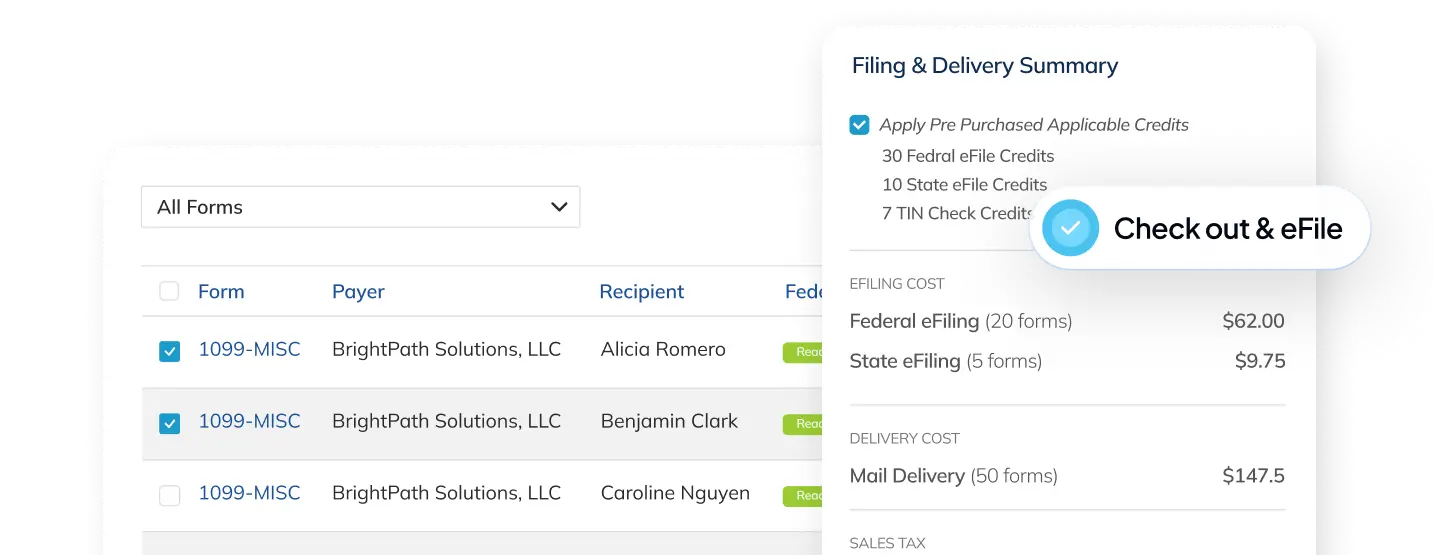
Go to the forms page, check the box(es) next to the ready form(s) you'd like to eFile, and click "Checkout & File". In checkout, select "Federal eFile" and any add-on services you’d like to include. You can also add these after you eFile. Pay with your credits or credit card at checkout, and enter a promo code or the code from your Adams kit if you have one.
After checkout, each form’s status updates as the IRS or SSA processes it, from queued to processing to complete, and you'll get an email confirmation of your order. It can take up to four weeks for the IRS to process returns during busy periods, but your eFiling date stays the same, no matter when your returns are processed.
You can eFile your State forms at the same time as your Federal forms, provided the recipient’s state accepts eFiling. Follow the same steps as for Federal eFiling, and select "State eFile" in Checkout. You can also select "Federal eFile" at this point, if relevant. If the recipient’s state is part of the IRS Combined Federal/State Filing (CF/SF) Program, its copy must be filed together with the federal form, and the IRS then passes it on to the state.
You can securely share forms with recipients using our Email Delivery service.
To share a form with a recipient, they must have an email address on file. To add or edit it, go to the recipients page, open the recipient and save their email address. Then add Email Delivery to your forms at checkout, or any time after you eFile. Each recipient gets a secure link to their form.
You can track the email status of every form on the forms page, in each form's status history, and in reports.
Each form shows one of these email statuses: Sent, Accessed, Locked or Expired.
If the secure link you originally sent has expired, or you want to send it to a new email address, update the recipient's email address on the recipients page if needed, then resend the form from the forms page. The new link goes to the address on file.
Go to the forms page, select the form(s) you want to print and click "Print". Choose blank paper to create a copy for your own records or to share with employees and recipients. (These printouts can’t be filed with the IRS or SSA, and Copy A, the government’s copy, can’t be printed on blank paper.)
Choose which copy to print. Each form has several, for different people. For example, Copy B goes to the recipient. Preview your forms, then print and hand them out.
Want to avoid the hassle of printing and delivering forms? Add Mail Delivery or Email Delivery, even after you eFile. Check out our pricing page for more information.
Go to the forms page, select the form(s) you want and click "Print". Choose blank paper and your copy type (B, C, etc.), then choose “Print” for a hard copy or “Download” for a PDF. You can also hide recipients’ tax ID numbers for privacy. (These copies are not suitable for filing with the IRS or SSA, and you cannot print a Copy A form on blank paper.) Downloads appear in your computer's Downloads folder and open in your browser or any PDF reader.
When you print or download, you’ll be asked to choose a copy. Each option shows who it’s for, such as the IRS, your state, the recipient or your records.
Once you've added Mail Delivery, you can track your forms from the forms page. Check the mail column for the current status of each form, or open a form's status history to see every step. You can also track delivery status from reports.
Each form moves through Preparing for printing, Printing and packaging, then Mailed on [date].
Go to the recipients page, open the recipient and update their email address. Then resend the form from the forms page. The new secure link goes to the updated address.
Filing with paper forms
If you've purchased an Adams® Tax Forms Kit online or in a store, your pack contains a brightly colored sheet with an item number and a case-sensitive access code. You'll need both to print without a watermark. Sign in or create an account, and enter your item number and access code when prompted.
Go to the forms page, select the form(s) you want to print and click "Print". Choose pre-printed forms and your copy (A, B, C, etc.), then preview your forms. Print at actual size (100%) with "Print on both sides" turned off.
When you're ready, print onto the forms from your Adams® Tax Forms Kit and complete your filing.
No. Plain paper copies are fine for your records and your recipients, but not for the IRS or SSA. The government’s copy (Copy A) must be printed in a special red ink their scanners can read. Plain paper copies may cause delays or penalties.
If you’re mailing forms to the IRS or SSA, use official red-ink forms for Copy A and for the summary form (1096 or W-3) that goes with them.
Shop Adams paper forms at tops-products.com
Managing your account
If you're signed in, go to “My Account”, then “Security”, to change your password.
If you can't sign in, select "Forgot Password" on the login page and enter the email address associated with your account. We'll email you a 6-digit verification code. (You may need to check your Spam or Junk folder.) Enter the code, press "Verify", then enter and confirm your new password and press "Save".
Go to “My Account”, then “Security”. Here you can change your password and update your multi-factor authentication settings.
To change where you receive notifications, go to “My Account” and update your notification email address, then press "Save".
(This does not change your sign-in email or the email you use for multi-factor authentication. It only changes where receipts, order and status updates are sent.)
Adams® Tax Forms Helper® requires all users to set up multi-factor authentication. To change the phone number or email address where we send your code, go to “My Account”, then “Security”.
Choose “Phone or Email”, enter the new number or address, and verify the 6-digit code we send. (To verify by phone, make sure your number can receive SMS text messages.)
When signing in, your code will expire after 60 minutes. You have up to 5 attempts to enter it correctly. If you get locked out, wait 5 minutes before trying again.
If you didn't receive a code, click "Resend". If you don't have access to your phone, reach out through our chat support to switch to email or a new phone number. Use "verification code" in your message and our Customer Service team will get back to you.
If you get a code you didn’t ask for, someone else may be trying to sign in to your account. Sign in and change your password to protect your Adams Tax Forms Helper® account.
It’s also a good idea to change the password on any other accounts where you use the same one.
If you're retiring or leaving a company, you can transfer your account to someone else. Go to My Account and invite the new owner by email. (This email address cannot already be associated with an Adams Tax Forms Helper® account.)
They set up their own password and multi-factor authentication when they accept. Once they accept, the account and its data move to them and you are signed out.
Glossary
2FA - 2 Factor Authentication
AES - Advanced Encryption Standard
CPA - Certified Public Accountant
CSV - Comma Separated Values
IRS - Internal Revenue Service
MFA - Multi-Factor Authentication
PDF - Portable Document Format
SSA - Social Security Administration
SSAE-18 - Statement on Standards for Attestation Engagements No. 18
TCC - Transmitter Control Codes
TIN - Taxpayer Identification Number
TLS - Transport Layer Security
Looking for an answer to
a different question?
Contact support